Golf Log Book KDP Interior Template: A Practical Guide to Quality and Usability
Creating a successful low-content book on Amazon KDP requires more than just uploading a generic PDF; it demands a product that genuinely serves the end user. For creators targeting the golfing niche, a well-structured Golf Log Book KDP Interior Template is the foundation of a profitable asset. Golfers are meticulous by nature. They track handicaps, analyze swing speeds, and record course conditions with precision. If your logbook does not facilitate this data entry seamlessly, it will receive poor reviews regardless of how attractive the cover is. This template package is designed to bridge the gap between amateur design and professional publishing standards, providing editable source files and pre-tested interiors that respect the specific needs of the golfing community.
Understanding the Value of Editable Source Files
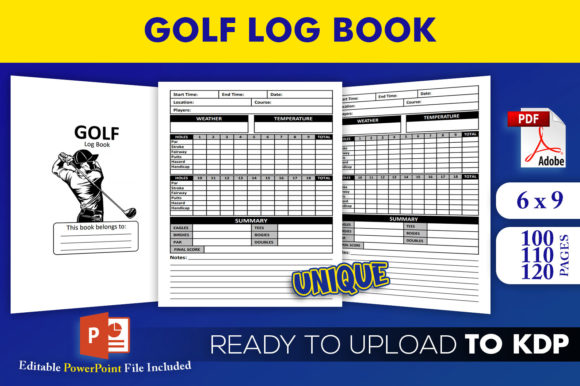
One of the most significant advantages of this specific template collection is the inclusion of an editable PowerPoint (PPTX) source file. Many creators mistakenly believe that purchasing a static PDF interior is sufficient for long-term success. While PDFs are necessary for printing, relying solely on them limits your ability to differentiate your product in a saturated market. The editable PPTX allows you to modify fonts, adjust column widths, or add custom branding elements without needing expensive graphic design software like Adobe InDesign.
A common oversight occurs when sellers use templates exactly as they are out of the box. This leads to duplicate content issues where dozens of books share identical interiors. By utilizing the editable source file, you can make subtle but meaningful changes—such as adding a "Course Rating" field or adjusting the layout for left-handed players—that signal to Amazon’s algorithm and potential buyers that your book offers unique value. This customization capability transforms a commodity into a specialized tool.
Navigating Trim Sizes and Margin Safety
The 6 x 9 trim size included in this download is the industry standard for portable logbooks, fitting easily into golf bags and back pockets. However, a frequent technical error involves misunderstanding bleed and margin requirements for this specific dimension. Even though these files have been tested on KDP, users often inadvertently alter margins during the editing process, leading to rejection or text being cut off during printing.
When working with the 6 x 9 format, remember that the binding edge (gutter) requires more whitespace than the outer edges. A logbook crammed with text right up to the spine is frustrating to write in because the curvature of the pages makes the inner columns inaccessible. Before finalizing your project, always verify that your safe zone remains intact after any edits. The provided templates are pre-configured correctly, but if you resize elements or change page counts, you must re-validate these measurements. Utilizing the high-resolution interiors ensures crisp lines, but only if the spatial geometry remains accurate.
Selecting the Appropriate Page Count
This download includes three distinct interior variations: 100, 110, and 120 pages. Choosing the wrong page count is a strategic mistake that affects both profitability and user satisfaction. New creators often default to the highest page count, assuming more value equals better sales. In reality, a 120-page logbook may be too bulky for a casual player who only plays twice a month, while a 100-page book might feel insubstantial to a dedicated enthusiast tracking a full season.
Consider the physical spine width when making this decision. Books under 100 pages cannot have text on the spine, which significantly reduces visibility on a bookshelf or in search results. The 110 and 120-page options allow for spine text, enhancing discoverability. Conversely, higher page counts increase printing costs, which eats into royalties unless priced appropriately. Analyze competitor pricing and reviews to determine which length aligns with current market expectations before selecting your file.
Avoiding Common Content and Layout Pitfalls
Even with high-resolution files, usability errors can undermine the quality of a Golf Log Book KDP Interior Template. Golfers need functional layouts, not decorative clutter. A prevalent mistake is prioritizing aesthetics over utility. Faint gray lines may look elegant on a screen, but they can be difficult to see outdoors in bright sunlight or when wearing polarized sunglasses. Ensure that line weights and contrast ratios remain high enough for practical field use.
Another critical detail is the logical flow of information. Some templates place scoring sections at the bottom of the page, forcing users to flip back and forth while playing. Effective logbooks follow the natural progression of a round: date and weather at the top, hole-by-hole scoring in the middle, and post-round reflection or statistics at the bottom. Review the provided interiors against real-world scorecards to ensure the data entry points match how golfers actually think and record their games. If the template requires adjustment, use the PPTX file to reorder sections before generating your final PDF.
Verifying File Integrity Before Upload
Although these files have been tested on KDP, platform specifications can change, and user environments vary. Never assume a file is ready simply because it was marketed as such. Always run your final PDF through the KDP Previewer tool before publishing. Check specifically for:
- Blank Pages: Ensure no accidental blank pages were inserted during the export from PowerPoint, as this disrupts the two-page spread layout essential for scorekeeping.
- Font Embedding: Verify that all fonts are embedded in the PDF. Missing fonts can cause text substitution, ruining the alignment of score tables.
- Image Resolution: Zoom in to 100% in the previewer to confirm that grid lines and headers remain sharp and do not appear pixelated.
Taking ten minutes to validate these technical aspects prevents the embarrassment of receiving one-star reviews citing printing defects. It also protects your account health, as repeated upload failures or quality issues can flag your publishing profile.
Strategic Differentiation Through Customization
To maximize the return on this template investment, treat the base files as a starting point rather than a finished product. Successful publishers use the editable nature of this resource to create series or niche-specific variants. For example, you could adapt the standard interior into a "Junior Golfer" edition by enlarging the writing spaces and simplifying the stats section, or a "Tournament Tracker" by adding fields for net scores and handicap adjustments.
This approach leverages the high-resolution assets while avoiding direct competition with other sellers using the same unmodified template. It also demonstrates expertise and care, signaling to buyers that you understand their specific segment of the golfing world. Remember that the goal is to solve a problem for the user. Every modification should enhance the logging experience, not merely change the appearance for novelty's sake.
Making an Informed Decision
Before downloading or purchasing, assess whether this Golf Log Book KDP Interior Template aligns with your current skill level and business goals. If you are entirely new to KDP, start with the pre-made PDFs to learn the upload process without overwhelming yourself with design work. As you gain confidence, transition to the PPTX files to build proprietary assets. Evaluate the sample pages critically: do they include the specific metrics your target audience cares about? Is the paper color consideration accounted for in the contrast?
Ultimately, the quality of your published book depends on how thoughtfully you apply these resources. The template provides the structure and technical compliance, but your insight into the golfer's mindset provides the value. By avoiding common pitfalls regarding margins, page counts, and usability, and by leveraging the editable features to create a distinct product, you transform a simple digital download into a sustainable publishing asset. Focus on creating a tool that golfers will actually want to carry in their bag, and the sales will follow naturally from genuine utility and positive user experiences.