KDP Interior: 2021 Calendar Diary Template
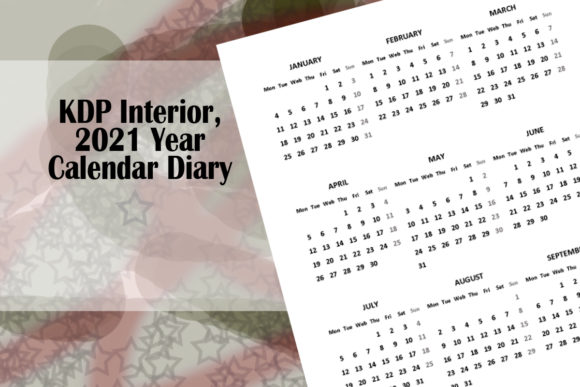
Creating a functional and aesthetically pleasing low-content book requires more than just uploading a generic PDF. It demands a balance of utility, design precision, and market awareness. The KDP Interior, 2021 Year Calendar Diary serves as a foundational asset for publishers looking to streamline their workflow without sacrificing quality. This specific interior features a neat, single-page design for the entire year, optimized for the popular 6×9 inch trim size with no bleed settings. While the date is historical, the structural template remains a vital case study in efficient diary layout and vector-based customization for modern creators.
For entrepreneurs and designers in the print-on-demand space, time is often the most significant bottleneck. Sourcing or creating a clean, minimalist calendar grid from scratch can consume hours of layout work. This resource eliminates that friction by providing editable source files alongside the print-ready PDF. By offering PPT, SVG, PNG, and PDF formats, it empowers users to adapt the content rather than simply republishing it. This flexibility is crucial for maintaining originality in a saturated marketplace and for developing a cohesive brand identity across multiple publications.
Strategic Customization Across Platforms
The true value of this interior lies in its multi-format compatibility. Different creators have different workflows, and having access to vector and presentation files allows for diverse approaches to product development. Understanding how to leverage each file type can significantly enhance the final output.
- Microsoft PowerPoint: Ideal for marketers and educators who may not be proficient in professional design software. You can easily adjust text boxes, change color schemes to match a niche aesthetic, or add motivational quotes to specific months without breaking the grid alignment.
- Adobe Illustrator & Inkscape: Best for graphic designers and illustrators. The SVG file allows for infinite scaling and precise manipulation of vector paths. Use this to integrate custom hand-drawn elements, modify line weights, or create complex layered backgrounds while keeping the calendar legible.
- PNG Assets: Useful for digital planners or social media promotion. Extract individual months as high-resolution images to use as marketing mockups or bonus digital downloads for customers purchasing the physical diary.
This interoperability ensures that whether you are a hobbyist using free tools like Inkscape or a professional publisher with an Adobe Creative Cloud subscription, the asset adapts to your existing ecosystem rather than forcing you to learn new software.
Niche Adaptation and Audience Targeting
A blank calendar is a commodity; a targeted planning tool is a product. To make the KDP Interior, 2021 Year Calendar Diary relevant today, you must look beyond the dates and focus on the user experience. The single-page yearly overview is a versatile component that can be integrated into various specialized journals.
Academic and Student Planners
Students require clear visualization of semester breaks, exam periods, and holidays. Using the editable PPT or SVG file, you can overlay academic terms onto the standard calendar grid. Color-coding semesters or adding dedicated spaces for course schedules transforms a generic yearly view into a strategic academic roadmap. The 6×9 dimension is particularly effective here, as it fits comfortably in backpacks and binders without adding bulk.
Fitness and Wellness Tracking
Health enthusiasts often prefer a bird’s-eye view of their consistency. Modify the interior to include small checkboxes next to each date for habit tracking, water intake, or workout completion. Because the design is set to "No Bleed," you have safe margins to add instructional headers or footer affirmations without risking content being trimmed during printing. This turns a passive reference page into an active engagement tool.
Small Business and Freelance Organization
Freelancers and solopreneurs need to visualize project deadlines and tax quarters. Utilize the vector files to add fiscal quarter dividers or project milestone markers directly onto the yearly spread. Pair this single-page overview with monthly lined pages to create a hybrid business planner. The clean, minimalist aesthetic appeals to professionals who want organization without visual clutter.
Technical Precision and Print Safety
One of the most common reasons for KDP rejection or poor customer reviews is formatting errors. This interior is pre-configured with "No Bleed" settings at 6×9 inches, which simplifies the publishing process but requires mindful editing. When customizing the template, always respect the safe zone. Since there is no bleed, all critical text and grid lines must remain within the designated margin area to prevent them from being cut off or appearing too close to the spine.
When modifying the file in Illustrator or PowerPoint, avoid dragging elements to the very edge of the artboard. Maintain a consistent gutter margin, especially if you plan to increase the page count by adding monthly or weekly spreads. The single-page calendar should act as an anchor; if you alter its dimensions or position, ensure it aligns perfectly with the rest of your manuscript. Consistency in margins and font hierarchy creates a professional feel that distinguishes premium interiors from amateur attempts.
Ethical Publishing and Originality
In the low-content book community, there is a fine line between using a template and duplicating content. Amazon’s algorithms and customers increasingly favor unique value. Simply re-uploading this PDF as-is offers little competitive advantage and risks being flagged as duplicate content. Instead, treat the KDP Interior, 2021 Year Calendar Diary as a raw material.
Change the typography to reflect your brand voice. Add proprietary tracking systems, unique prompts, or niche-specific reference data. If you are creating a gardening journal, integrate planting zones or frost dates into the yearly view. For a teacher’s planner, add grading cycles or conference schedules. These modifications not only ensure compliance with platform guidelines but also provide genuine utility to your specific audience. The goal is to solve a problem for the user, where the calendar serves as the framework for that solution.
Repurposing for Digital and Hybrid Models
Creativity extends beyond physical print. The inclusion of SVG and PNG files opens doors for digital product creation. Consider extracting the calendar layout to create printable wall calendars or digital planner stickers for tablet users. The vector nature of the SVG ensures that lines remain crisp regardless of screen resolution or print size.
For bloggers and content creators, these assets can serve as lead magnets. Offer a customized, branded version of the yearly overview as a free download to build your email list. This demonstrates practical generosity and establishes authority in your niche. By viewing the interior through a multi-platform lens, you maximize the return on investment and extend the lifecycle of the design asset far beyond a single KDP listing.
Maintaining Design Integrity
While customization is encouraged, clarity should never be compromised. A calendar’s primary function is readability. When adding colors, patterns, or additional data points, test the contrast rigorously. Dark backgrounds with light text may look striking on a screen but can become muddy or unreadable in standard black-and-white KDP printing. Stick to high-contrast combinations and ensure that grid lines do not compete with handwritten entries.
Organize your modifications logically. If you add a legend or key to explain symbols used in the yearly view, place it intuitively near the calendar. Consistency in visual language helps users navigate the book effortlessly. Remember that the best design is invisible; it facilitates the user's intent without drawing attention to itself. By grounding your creative decisions in usability, you create products that are both beautiful and enduringly useful.