Mastering Organization with a Week Agenda: Design, Utility, and KDP Publishing
In an era dominated by digital notifications and fleeting calendar alerts, the tangible act of writing down a plan remains a cornerstone of effective personal management. The Week Agenda serves as more than just a collection of dates; it is a structured framework for intentionality. Whether you are a busy professional juggling client meetings, a student managing coursework, or an entrepreneur launching a low-content publishing business on Amazon KDP, understanding the nuances of a high-quality weekly planner is essential. This guide explores the practical applications, design specifications, and publishing considerations for the 8.5x11in editable Week Agenda template.
The Functional Anatomy of a Weekly Planner
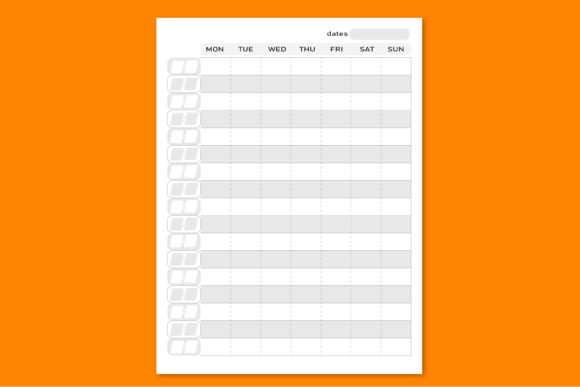
To truly leverage a Week Agenda, one must first understand what distinguishes a superior layout from a generic calendar. A well-designed agenda bridges the gap between high-level goal setting and daily execution. When evaluating or utilizing a 120-page template sized at 8.5x11 inches, several functional characteristics define its utility.
Visual Hierarchy and Cognitive Load
The primary purpose of any planning tool is to reduce mental friction. An effective Week Agenda employs a clear visual hierarchy that allows the user to scan their commitments instantly. In an 8.5x11 format, there is ample real estate to separate distinct categories without creating clutter. Key elements often include:
- Dedicated Time Blocking: Vertical columns or horizontal rows that allow for hourly scheduling, crucial for professionals who bill by time or manage strict appointments.
- Priority Segmentation: Distinct areas for "Top 3 Tasks" or "Must-Dos" that prevent urgent but unimportant tasks from overshadowing strategic goals.
- Notes and Reflection Space: Blank or dotted sections that accommodate brainstorming, meeting minutes, or end-of-week reviews.
- Habit Tracking Integration: Small grids or checkboxes embedded within the weekly spread to maintain consistency in personal development routines.
When using an editable Adobe Illustrator file, creators can adjust these elements to match specific audience needs. For example, a teacher’s Week Agenda might require larger spaces for lesson planning, whereas a fitness coach might need integrated water intake and workout logs.
Technical Specifications for Creators and Publishers
For those looking to publish or customize a Week Agenda, technical precision is non-negotiable. The product specification of "PDF Template Size – 8.5x11in Letter Editable in Adobe Illustrator" indicates a professional-grade asset designed for print readiness. Understanding these parameters ensures that the final physical product meets consumer expectations and platform requirements.
The Importance of the 8.5x11 Inch Standard
The US Letter size (8.5 x 11 inches) is the gold standard for American markets and many international business environments. This dimension offers significant advantages over smaller formats like A5 or pocket planners:
- Writing Comfort: Users with larger handwriting or those who prefer detailed notes find the full letter size less restrictive.
- Desktop Compatibility: It fits perfectly into standard filing cabinets, desk trays, and three-ring binders, making it ideal for office-based professionals.
- Print Economy: For KDP publishers, this size aligns with standard paper stock, often resulting in efficient printing costs and faster fulfillment times.
Navigating Adobe Illustrator Files
The inclusion of an editable Adobe Illustrator (.ai) source file transforms a static PDF into a versatile design asset. Unlike Canva or basic PDF editors, Illustrator provides vector-based precision. This is critical when modifying a Week Agenda for commercial use. Vectors ensure that lines remain crisp at any zoom level and that text remains sharp during the printing process. When working with these files, users should pay attention to:
- Layer Management: Professional templates organize elements into logical layers (e.g., Background, Grid, Text, Margins). This allows for quick global changes without accidentally shifting alignment guides.
- Bleed and Safe Zones: Even though the trim size is 8.5x11, KDP requires bleed for edge-to-edge printing. A proper template includes preset artboards accounting for the 0.125-inch bleed on outer edges.
- Font Licensing: Editable files may contain placeholder fonts. Always verify licensing before publishing a modified Week Agenda commercially to avoid intellectual property issues.
Strategic Applications Across Different User Groups
A single Week Agenda template can serve vastly different purposes depending on the end-user's context. Recognizing these varied applications helps in both selecting the right planner and marketing it effectively.
For the Solopreneur and Freelancer
Independent workers often struggle with the lack of external structure. A comprehensive 120-page Week Agenda acts as an external accountability partner. The two-page weekly spread allows freelancers to visualize project timelines alongside administrative tasks. By customizing the template to include invoice tracking or content calendars, solopreneurs create a bespoke command center that generic store-bought planners cannot provide.
For Academic and Educational Use
Students and educators benefit from the spacious nature of the 8.5x11 format. A semester typically spans 15 to 17 weeks. A 120-page Week Agenda provides enough volume to cover two full academic terms, including breaks and exam periods. Educators can utilize the editable nature of the file to add school-specific branding, bell schedules, or grading rubrics directly into the weekly spreads, creating a unified organizational tool for their classroom.
For KDP Publishers and Low-Content Creators
The "Ready KDP upload" feature is perhaps the most significant value proposition for digital entrepreneurs. Creating a 120-page interior from scratch is time-prohibitive. Using a pre-formatted Week Agenda allows publishers to focus on niche research and cover design rather than interior typesetting. However, success in this space requires differentiation. Simply uploading the stock template rarely yields sales. Successful publishers use the Illustrator file to:
- Add unique motivational quotes relevant to a specific niche.
- Adjust margin sizes to accommodate spiral binding if selling outside of KDP.
- Create complementary digital versions for tablet users.
- Bundle the physical agenda with digital stickers or online courses.
Evaluating Suitability and Managing Expectations
While a professionally designed Week Agenda is a powerful tool, it is not a magic solution. Prospective users and creators must approach it with realistic expectations regarding workflow integration and production limitations.
The Learning Curve of Customization
Adobe Illustrator is industry-standard software with a steep learning curve. Users accustomed to drag-and-drop interfaces may initially find vector manipulation challenging. Before purchasing an editable Week Agenda, assess your current skill level. If you lack Illustrator experience, consider whether the time investment to learn the software outweighs the cost of hiring a designer or finding a simpler editing platform. However, for those willing to learn, the long-term ability to create unlimited planner variations is invaluable.
Physical Limitations of KDP Printing
Amazon KDP offers incredible accessibility, but it has constraints. Standard color printing is available, but premium color is significantly more expensive, which can erode profit margins on a 120-page book. Most Week Agenda interiors are designed in black and white specifically to keep production costs low while maintaining aesthetic appeal through grayscale shading and line weight variation. Additionally, KDP does not currently offer spiral binding or hardcover options for all sizes. If your target audience demands a lay-flat binding or durable hardcover, you may need to supplement KDP with other print-on-demand services or local printers, using the same 8.5x11 source file.
Digital vs. Analog Hybrid Workflows
Modern productivity often exists in a hybrid state. While the Week Agenda discussed here is primarily a print product, many users now import PDF planners into apps like GoodNotes or Notability. The 8.5x11 size translates reasonably well to iPad screens, though some users prefer landscape orientations for digital use. When designing or selecting a template, consider how the layout functions digitally. Are the writing spaces large enough for a stylus? Is the contrast sufficient for backlit screens? A versatile Week Agenda performs adequately in both physical and digital realms.
Making the Right Choice for Your Needs
Selecting or creating the perfect Week Agenda requires aligning features with actual behavior. Ask yourself the following questions before committing to a template:
- Do I need dated or undated pages? Undated templates offer longevity and reduce waste, allowing users to start anytime. Dated templates require annual updates but provide immediate structure.
- Is the page count appropriate? 120 pages typically covers six months of weekly spreads plus introductory and closing pages. If you need a full year, you may need to combine two volumes or seek a condensed layout.
- Does the aesthetic match the function? Minimalist designs reduce distraction, while illustrated themes can boost mood and engagement. Choose based on cognitive preference, not just visual trend.
Ultimately, the value of a Week Agenda lies in its consistent use. Whether you are printing a single copy for personal mastery or publishing thousands for a global audience, the foundation remains the same: clarity, consistency, and intentional design. By leveraging professional-grade, editable templates, you remove technical barriers and focus on what truly matters—transforming time into meaningful progress.